6 Free Seamless Vector Patterns for Professional Design Work
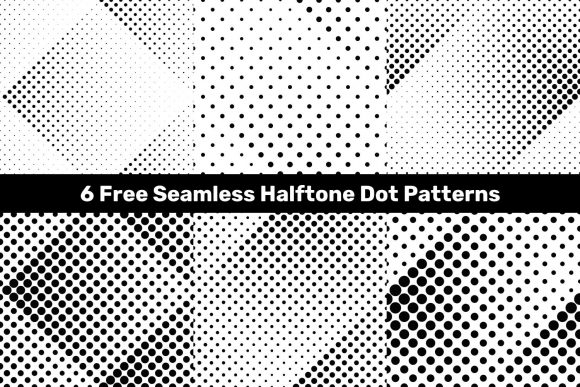
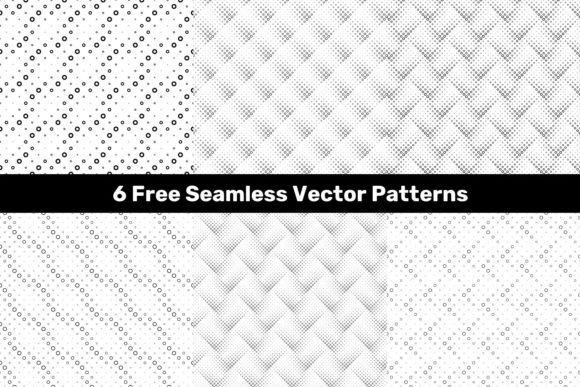
Vector pattern resources directly from professional design tools often come with restrictive licenses or high costs. Accessing a set like the 6 Free Seamless Vector Patterns changes that entirely. This package provides six monochrome circle patterns in JPG, EPS, and AI formats, giving you immediate flexibility for logos, branding assets, packaging, social media graphics, and presentations. With 5000x5000 pixel resolution, these patterns remain crisp whether you scale them down for a business card or up for a trade show banner.
Monochrome circle motifs are particularly versatile because they work across many visual styles. They can appear modern, architectural, playful, or formal depending on how you arrange them with your existing color palette. Having six distinct patterns inside one free package means you can test various looks for a project without searching for separate downloads. That alone can save several hours during the early stages of creative exploration.
What the Package Delivers and Why Format Variety Matters
The package includes six JPG files at 5000x5000 pixels, six vector EPS files, and six vector AI files. For practical use, the JPG versions work well when you need an immediate texture or background and you do not plan to modify the pattern. The EPS and AI files give you full control over every circle’s size, spacing, stroke weight, and color. This distinction matters if you need to adapt the pattern to a specific brand guideline or extend it into a repeating tile for a textile print or wallpaper.
Vector formats also allow you to export at any resolution without pixelation. If you are designing for both web and print, you can start with the AI file, create variations, and output each version at the required DPI. The monochrome nature of these patterns simplifies further editing—you can apply a single spot color or gradient without worrying about competing hues inside the pattern itself.
Practical Time Savings for Designers and Non-Designers
For freelancers and small business owners, every minute counts. Building a seamless pattern from scratch in Illustrator or Affinity Designer can take 20 to 40 minutes, even with experience. The 6 Free Seamless Vector Patterns eliminate that setup time entirely. You can open the AI file, adjust the stroke thickness or circle radius, and have a ready-to-use background in under five minutes.
Entrepreneurs who produce their own social media content will find the JPG files immediately usable as Instagram story backgrounds, YouTube thumbnail textures, or LinkedIn banner accents. The 5000x5000 resolution ensures that even when cropped or scaled, the image remains sharp. This is especially helpful if you are repurposing the same pattern across multiple platforms with different image size requirements.
Real Use Cases Across Professional Roles
Marketers and bloggers often need visual consistency without hiring a dedicated designer. A monochrome circle pattern can serve as a subtle background for quote cards, product photos, or email headers. Because the pattern is uniform and non-distracting, it reinforces brand recognition without competing with text or product visuals. For example, using the same pattern across three blog posts creates a cohesive series feel that readers come to expect.
Educators and publishers who prepare workbooks, handouts, or slide decks can use these patterns to add visual breaks between sections. A circle pattern applied to a section divider page or a sidebar makes the document feel more polished without requiring extra illustration skills. Since the patterns are monochrome, they print cleanly in black and white, which is often a limitation when using colorful stock graphics.
Hobbyists and makers who design stickers, greeting cards, or fabric prints will appreciate the seamless nature of the patterns. A seamless pattern repeats without visible edges, which is essential for printed materials where a visible seam would look unprofessional. You can upload the EPS file directly to print-on-demand platforms that accept vector formats, such as those for fabric or wallpaper, and the result will tile perfectly.
How These Patterns Support Creative Exploration
Creative blocks often happen when you feel locked into one visual direction. Having six distinct monochrome circle patterns gives you immediate alternatives. If one pattern feels too dense for a minimalist brand, you can try another with more open spacing. If a project requires a texture that suggests movement, a pattern with overlapping circles of varying radii will convey that better than a rigid grid.
Because the patterns are vector-based, you are not limited to the original monochrome look. You can apply gradients, change stroke colors, or overlay multiple patterns using blending modes. This flexibility makes the 6 Free Seamless Vector Patterns a starting point rather than a finished asset. Designers who work with clients in different industries—tech, health, education, or hospitality—can adapt the same base pattern to match each client’s brand personality.
Who Benefits Most from This Resource
Freelance graphic designers and part-time creators often work with limited budgets. Free vector packages that include multiple formats and high resolution are rare. Having EPS and AI files means you can open them in any major vector software—Adobe Illustrator, CorelDRAW, Affinity Designer, or even Inkscape. This cross-compatibility removes the worry about file version issues or proprietary formats.
Small business owners who handle their own marketing materials will find the JPG files especially useful because they require no software beyond basic image editing tools. You can download, resize, and apply the pattern to a flyer or digital ad immediately. The 5000x5000 resolution also means you can print at large sizes without quality loss, which is relevant for banners, posters, or even trade show displays.
Students and educators in visual communication or design courses can use these patterns as practice material. Recreating a pattern manually by studying the EPS structure is a great way to understand how seamless repeating designs function. Alternatively, using the pattern as a background for a project presentation adds a professional touch without spending time on non-essential details.
Limitations and Fit Considerations
Monochrome circle patterns are not suitable for every project. If you need botanical, geometric, or abstract multicolored designs, this package will feel limiting. The patterns are also relatively uniform in their theme—all six are based on circles arranged in different ways. If your project requires a textured, organic, or photo-based background, you will need to look elsewhere.
Additionally, while the vector files are editable, the JPG versions are flat raster images. If you plan to change the pattern extensively, start with the EPS or AI files. The JPGs are best used as-is, which is fine for many quick applications but not ideal for work that requires deep customization. Understanding these limitations helps you decide when this package is the right tool versus when you should invest in a broader resource library.
Practical Recommendations for Getting Started
Open the AI file first and experiment with scaling the pattern up or down. A pattern that looks good at its original size may become too busy when scaled to 200 percent, or too sparse when reduced. Adjusting the spacing between circles can change the overall feel significantly. Try applying the pattern to a single-color background to see how it interacts with the negative space.
If you plan to use the pattern on a website, consider exporting at 72 DPI from the vector file to keep file size manageable. For print media, export at 300 DPI and test a small sample to see how the monochrome design looks on paper. The EPS files are especially useful for large-format printing, as they remain resolution-independent up to any physical size.
Keep the package organized in your asset library with clear naming conventions. Because the patterns are monochrome and similar in theme, it can be easy to confuse them later. Assigning a descriptive name based on the circle arrangement—for example, “concentric rings light” or “overlapping small circles”—will save time when you need to retrieve a specific look for a future project.
Final Thoughts on Free Vector Resources
Free resources like the 6 Free Seamless Vector Patterns are valuable precisely because they remove friction from the early stages of design work. When you do not have to create every element from scratch, you can focus on composition, hierarchy, and message. The monochrome circle patterns in this package offer a clean, versatile foundation that works across digital and print media. Whether you are a seasoned designer looking for quick textures or a small business owner assembling a consistent brand identity, these files give you a reliable starting point that can adapt to many contexts.